Options: Difference between revisions
Jump to navigation
Jump to search
m (→ClassicUO) |
No edit summary |
||
| Line 1: | Line 1: | ||
== | [[Category:New Player]][[Category:Customization]] | ||
==Summary== | |||
There are many options players can tinker with to customize their experience. To access the Options menu: | |||
* | * Press CTRL O on the keyboard | ||
* | * Open your [[Paperdoll]] and click the Options button | ||
[[File: | [[File:optionsmenu0.png|alt=Paperdoll - Options|link=]] | ||
{{#ev:youtube|https://youtu.be/KrcBNfKAYok}} | ==List of Options== | ||
{| class="wikitable" style="text-align:center;" | |||
|- | |||
! Title | |||
! Description | |||
|- | |||
| General | |||
| | |||
|- | |||
| Sound | |||
| | |||
|- | |||
| Video | |||
| | |||
|- | |||
| Macros | |||
| | |||
|- | |||
| Tooltip | |||
| | |||
|- | |||
| Fonts | |||
| | |||
|- | |||
| Speech | |||
| | |||
|- | |||
| Combat-Spells | |||
| | |||
|- | |||
| Counters | |||
| | |||
|- | |||
| Info Bar | |||
| | |||
|- | |||
| Interface | |||
| | |||
|- | |||
| Experimental | |||
| | |||
|- | |||
| Profile Manager | |||
| | |||
|- | |||
| Window Manager | |||
| | |||
|- | |||
| Gump Manager | |||
| | |||
|- | |||
| Ignore List | |||
| | |||
|- | |||
| Nameplates | |||
| | |||
|- | |||
| Cooldowns | |||
| | |||
|} | |||
==Videos== | |||
{| class="wikitable" style="text-align: center;" | |||
|- style="vertical-align: bottom;" | |||
| {{#ev:youtube|https://youtu.be/S1qvXjVeiVo?si=o7UWhYTqbkCJ2UDo}} | |||
|- style="vertical-align: bottom;" | |||
| {{#ev:youtube|https://youtu.be/KrcBNfKAYok}} | |||
|} | |||
Revision as of 23:25, 29 January 2026
Summary
There are many options players can tinker with to customize their experience. To access the Options menu:
- Press CTRL O on the keyboard
- Open your Paperdoll and click the Options button
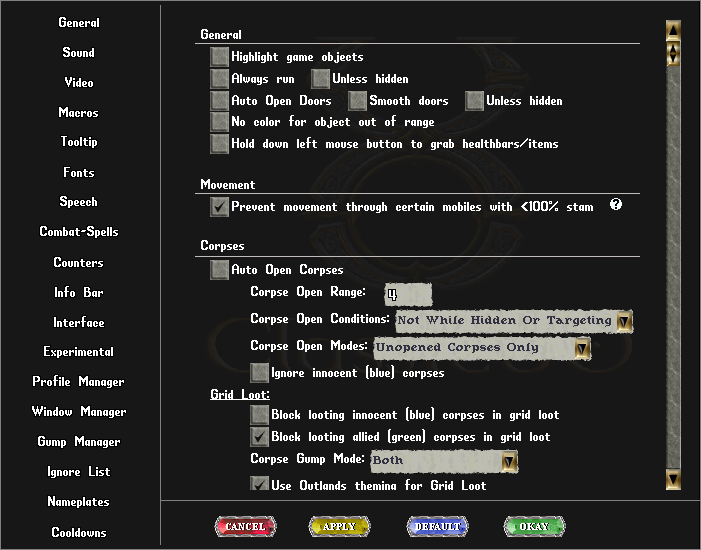
List of Options
| Title | Description |
|---|---|
| General | |
| Sound | |
| Video | |
| Macros | |
| Tooltip | |
| Fonts | |
| Speech | |
| Combat-Spells | |
| Counters | |
| Info Bar | |
| Interface | |
| Experimental | |
| Profile Manager | |
| Window Manager | |
| Gump Manager | |
| Ignore List | |
| Nameplates | |
| Cooldowns |