Summary
There are many options players can tinker with to customize their experience. To access the Options menu:
- Press CTRL O on the keyboard
- Open your Paperdoll and click the Options button
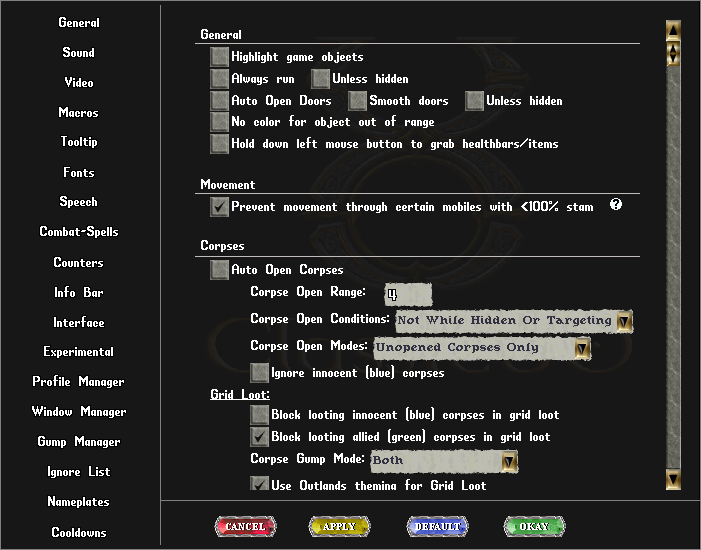
General
Sound
| Sound
|
- Sounds
- Music
- Login Music
- Play Footsteps
- Loop Music
- Combat Music
- Play Sounds in Background
- New Outlands Music
- Synchronize footstep sounds with animation
|
Video
| Video
|
| General
|
- Maximum Frame Rate
- Reduce Frame Rate when in Background
- Resolution
- Display Scale
- Anti-aliasing Mode
- Off
- On (FXAA)
- On (Anisotropic Clamp)
- On (Linear Clamp)
- Choose driver (requires client restart)
|
| World Viewport
|
- Always use fullsize game window
- Lock game window moving/resizing
- Game Play Window Position
- Game Play Window Size
- Default Zoom
- Enable mousewheel for in game zoom scaling (Ctrl + Scroll)
- Releasing Ctrl Restores Scale
- Upscale graphics when zoomed in
|
| Lights
|
- Light Level
- Dark Nights
- Use Colored Lights
|
| Misc
|
- Enable Death Screen
- Black & White mode for dead player
- Aura on mouse target
|
| Shadows
|
- Shadows
- Show tree and rock shadows
- Terrain Shadows level
|
Macros
| Macros
|
- New Macro
- Delete Macro
- Create Macro Button
- Advanced Button Editor
|
Tooltip
| Tooltip
|
- Use Tooltip
- Show Newbie Tooltips
- Tooltip zoom
- Tooltip background opacity
- Tooltip hue
- Tooltip font
|
Fonts
| Fonts
|
- Override game font
- Speech Font
- Enable Color Blind mode
- Color Blind Type
- Protanopia
- Deuteranopia
- Tritanopia
|
Speech
| Speech
|
- Scale speech delay
- Active chat when pressing ENTER
- Use additional buttons to activate chat
|
Videos